> ## Content Index
> Fetch the complete content index at: https://reactpractice.dev/llms.txt
> Use this file to discover other available public pages before exploring further.
# Add unit testing support to a React project using Vite and Typescript
- URL: https://reactpractice.dev/articles/add-unit-testing-support-to-a-react-project-using-vite-and-typescript/
- Published: 2025-02-17T14:35:13.000Z
- Updated: 2026-06-01T01:56:47.000Z
- Author: Corina Udrescu
- Tags: Articles, #corina-2, #Import 2026-06-09 12:07
If you want to test your components in a React + Vite project, the best way is using React Testing Library. This allows you to render your component with different props, interact with it and do assertions on the final output.
To get it set up, you first need to install `vitest` \- this will run the actual tests:
```
npm install -D vitest
```
Next, you'll need to install React Testing Library. Since the components will be rendered in a Node context, you need to install `jsdom`, which emulates the browser DOM for test purposes:
```
npm install -D @testing-library/react @testing-library/jest-dom @testing-library/user-event jsdom
```
Next, we need to configure how we want `vitest` to run our tests. We can do that in the `vite.config.ts` file:
```
///
import { defineConfig } from 'vite';
import react from '@vitejs/plugin-react';
// [https://vitejs.dev/config/](https://vitejs.dev/config/)
export default defineConfig({
plugins: [react()],
test: {
globals: true,
environment: 'jsdom',
setupFiles: ['./src/testing/setup-tests.ts'],
},
});
```
`globals: true` allows us to use `describe`, `test` and `it` statements in our code without having to first import them - great to keep the code concise!
We also linked to a test config file - we need this to configure React Testing Library custom assertions, like `expect(...).toBeInTheDocument()`. Let's create the file:
```
// src/testing/setup-tests.ts
import * as matchers from '@testing-library/jest-dom/matchers';
import { expect } from 'vitest';
expect.extend(matchers);
```
All right, now we're almost ready to run our first test - let's add the `test` script to `package.json`:
```
// package.json
{
...
"scripts": {
...
"test": "vitest"
},
...
}
```
When creating tests in React, you can place them in the same location as the component under test.
Let's create a test for the `App` component that the Vite boilerplate comes with:
```
// src/App.test.tsx
import { render, screen } from "@testing-library/react";
import App from "./App";
describe("App", () => {
it("renders the demo Vite text", () => {
render();
expect(screen.getByText("Vite + React")).toBeInTheDocument();
});
});
```
If we now run `npm run test` in the console, we'll see our test passes:
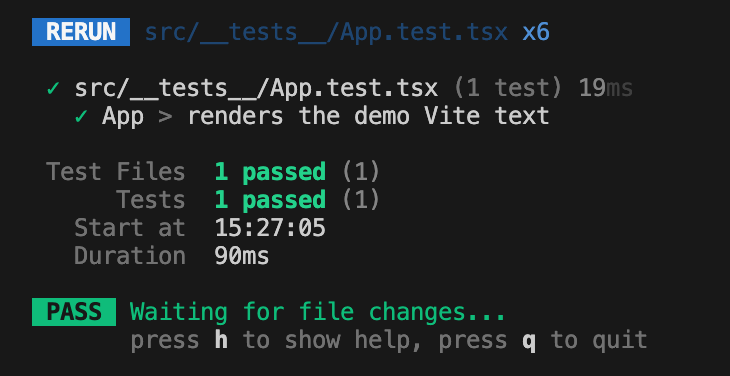
But our entire test file is red! Why is that?
Even if we configured `globals:true` in the Vite config file, Typescript still does not know of that. We need to update the `tsconfig.app.json` file to also recognise these globals:
```
{
"compilerOptions": {
...
"types": ["vitest/globals", "@testing-library/jest-dom"]
},
...
}
```
With this change in place, the red lines are gone and we can write unit tests in our app 💪
### Add support for mocking API requests with msw
msw is a library that allows mocking HTTP requests. This is very useful in tests, as it allows us to not call any backend directly, but instead use dummy responses, tailored to the specifics of the test.
First let's install it:
```
npm install -D msw
```
Then, we'll create a new file under the `testing` folder where we'll define our mock server:
```
// testing/mock-api-server.ts
import { setupServer } from "msw/node";
const server = setupServer();
export default server;
```
Finally, we need to configure the mock server to listen for requests before every test by updating the global setup file:
```
// testing/setup-tests.ts
import { expect, afterEach } from "vitest";
import { cleanup } from "@testing-library/react";
import * as matchers from "@testing-library/jest-dom/matchers";
import server from "./mock-api-server";
expect.extend(matchers);
beforeAll(() => server.listen());
afterEach(() => {
server.resetHandlers();
cleanup();
});
afterAll(() => server.close());
```
And that's it - you can now use mocks in your tests!
Here's an example component you can use to test everything works as expected:
```
import { useEffect, useState } from "react";
const RandomQuote = () => {
const [quote, setQuote] = useState();
useEffect(() => {
fetch("https://api.quotable.io/quotes/random")
.then(function (response) {
return response.json();
})
.then(function (data) {
setQuote(data[0].content);
});
}, []);
return {quote}
;
};
export default RandomQuote;
```
And here's the test:
```
import { render, screen } from "@testing-library/react";
import { http, HttpResponse } from "msw";
import server from "../testing/mock-api-server";
import RandomQuote from "./RandomQuote";
describe("RandomQuote", () => {
beforeEach(() => {
server.use(
http.get("https://api.quotable.io/quotes/random", () => {
return HttpResponse.json([
{
_id: "2i4ILvPHXsgJ",
content:
"If you accept the expectations of others, especially negative ones, then you never will change the outcome.",
author: "Michael Jordan",
tags: ["Change", "Wisdom"],
authorSlug: "michael-jordan",
length: 107,
dateAdded: "2019-08-16",
dateModified: "2023-04-14",
},
]);
})
);
});
it("renders a quote", async () => {
render();
expect(
await screen.findByText(/If you accept the expectations of others/)
).toBeInTheDocument();
});
});
```