> ## Content Index
> Fetch the complete content index at: https://reactpractice.dev/llms.txt
> Use this file to discover other available public pages before exploring further.
# Code review: reader solution to Memory Game
- URL: https://reactpractice.dev/code-reviews/code-review-reader-solution-to-memory-game/
- Published: 2024-06-03T09:58:11.000Z
- Updated: 2026-06-01T01:59:19.000Z
- Author: Corina Udrescu
- Tags: Code reviews, #corina-2, #Import 2026-06-09 12:07
💡
This is a code review of the solution to the Memory game exercise that a user submitted.
Repository: [https://github.com/stivendiaz/memory-game](https://github.com/stivendiaz/memory-game?ref=reactpractice.dev)
Page: [https://stivendiaz.github.io/memory-game/](https://github.com/stivendiaz/memory-game?ref=reactpractice.dev)
Thoughts at first glance:
- great that the app is responsive and uses Typescript
- really cool that is also deployed to Github Pages
Now let's go over the implementation step by step:
### Initialising the state
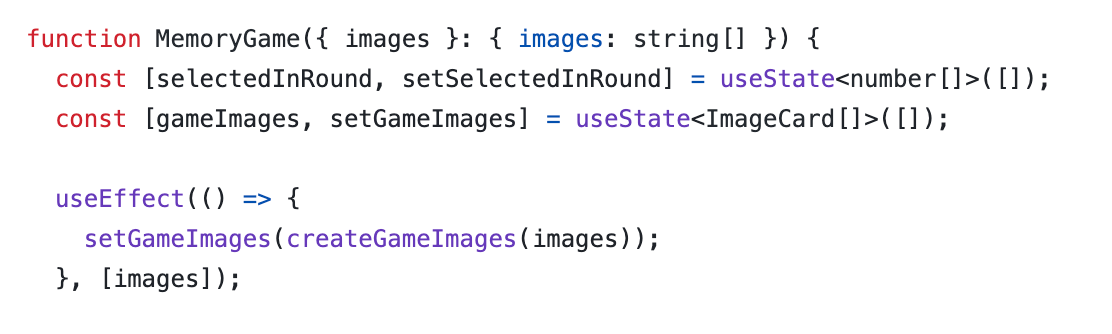
- ✅ Good example of using `useEffect` to keep the initial value updated when the props change; in this scenario it's an appropriate use, as `gameImages` gets changed further down the line; if we didn't need to change it, then a simple `const gameImages = createGameImages(images)` would have been enough. Read more [here](https://react.dev/learn/you-might-not-need-an-effect?ref=reactpractice.dev#updating-state-based-on-props-or-state) and [here](https://www.robinwieruch.de/react-derive-state-props/?ref=reactpractice.dev);
### The select event handler
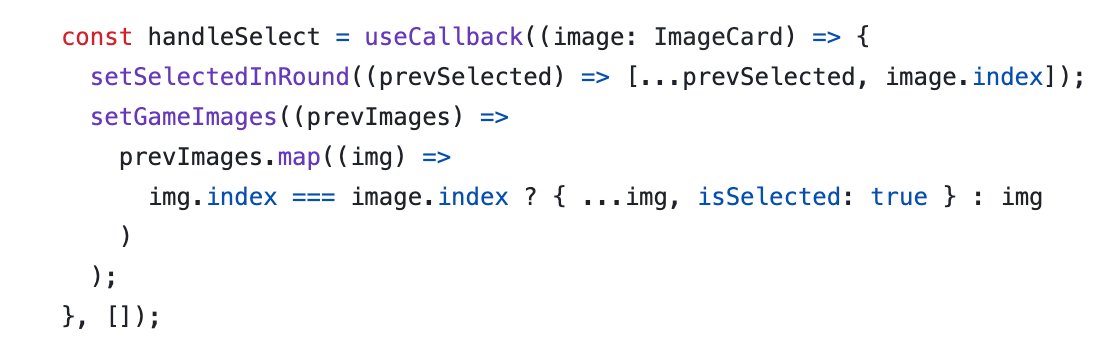
- ⚠️ When going over the comparison `img.index === image.index`, it's hard to see immediately which image is which - maybe consider using more clear names, for example `selectedImage` instead of just `image`?
- ⚠️ You should avoid using `useCallback` unless there is a clear performance optimisation you're working towards. See the [docs for a detailed description](https://react.dev/reference/react/useCallback?ref=reactpractice.dev#should-you-add-usecallback-everywhere).
### The effect that checks the status of the round
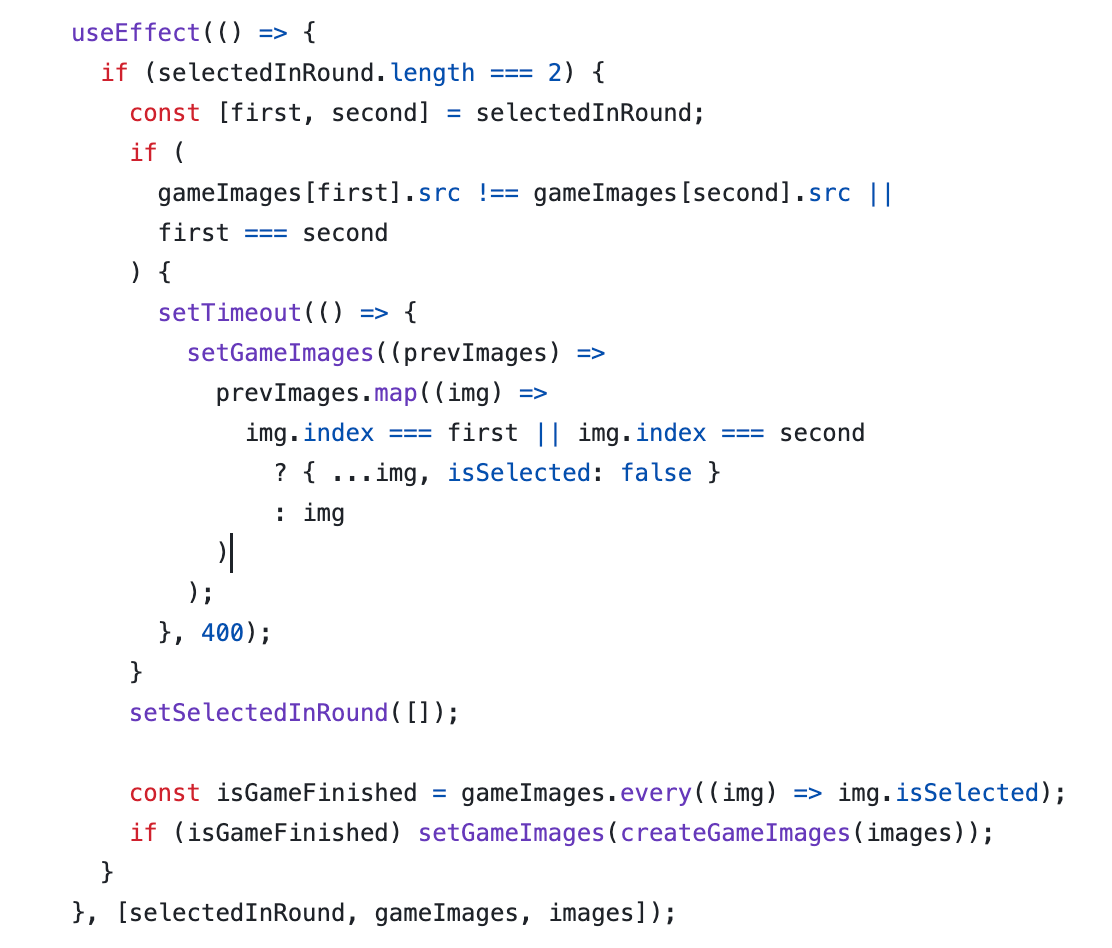
- ❌ This snippet does not "[synchronise a component with an external system](https://react.dev/reference/react/useEffect?ref=reactpractice.dev)", so this should not be in an effect! Since the code just updates the round state based on the latest user selection, you should just make it part of the `handleSelect` event handler. Read more details in the [official docs description](https://react.dev/learn/you-might-not-need-an-effect?ref=reactpractice.dev#sharing-logic-between-event-handlers).
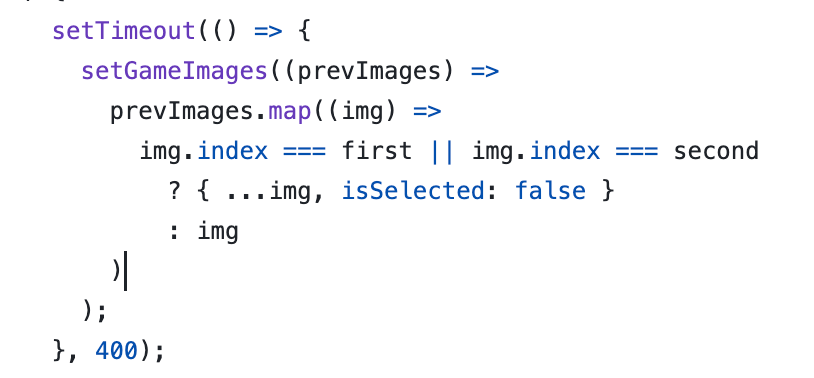
- ❌ Updating state with a timeout should not be neccessary - it's usually a red flag that you're using an anti-pattern somewhere else. I expect that by moving the code above to the `handleSelect` event handler, you'll no longer need this!
Here is an example of an updated `handleSelect`, that includes the code that checks the round status and no longer has the set timeout:
```
const handleSelect = (image: ImageCard) => {
const selectedCurrentRound = [...selectedInRound, image.index]
const updatedImages = gameImages.map((img) =>
img.index === image.index ? { ...img, isSelected: true } : img
)
// if round is over - i.e. user clicked two images
if (selectedCurrentRound.length === 2) {
const [first, second] = selectedCurrentRound;
// if we don't have a match
if (
gameImages[first].src !== gameImages[second].src ||
first === second
) {
// flip images back around
setGameImages(
updatedImages.map((img) =>
img.index === first || img.index === second
? { ...img, isSelected: false }
: img
)
);
}
// and reset the round (aka the selected indexes)
setSelectedInRound([]);
// if at the end of the round all images are selected
// reset the game
const isGameFinished = updatedImages.every((img) => img.isSelected);
if (isGameFinished) setGameImages(createGameImages(images));
} else {
// else continue the game
setSelectedInRound(selectedCurrentRound);
setGameImages(updatedImages);
}
}
```
### Other notes
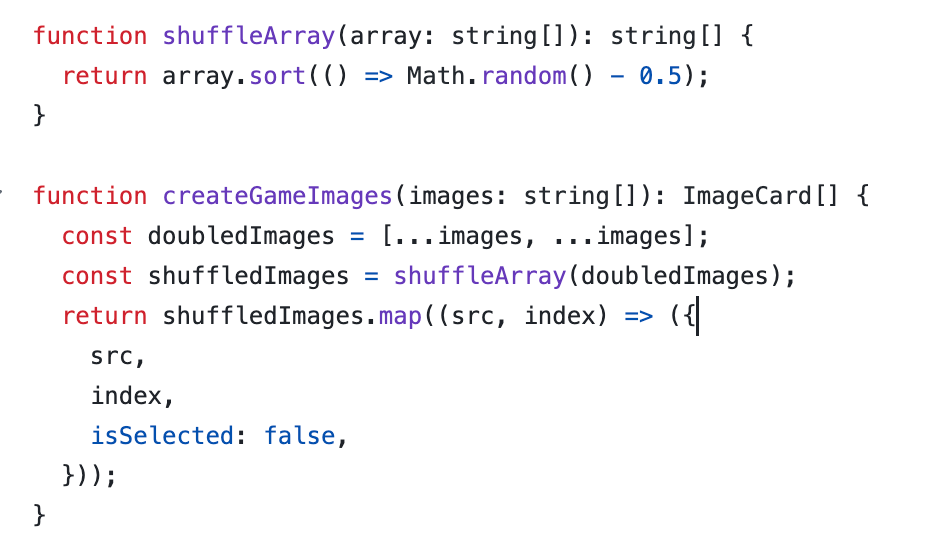
- ✅ Very nice clean way to structure the code - clear separation of concerns, each function does one thing (i.e. `shuffleArray` is its own function); Tip: consider using lodash's library [shuffle](https://www.geeksforgeeks.org/lodash-%5F-shuffle-method/?ref=reactpractice.dev) method instead of custom implementation
- ✅ Clear naming of variables, immediately clear what each one holds

- ✅ Another plus one for extracting the `isSelected` check into a variable, to improve readability

- ⚠️ Consider️ renaming the `img` prop to simply `image` \- e.g. ``
- ⚠️ Consider️ renaming `handleSelect` prop to `onSelect` \- e.g. \` ``